PostgreSQL IN vs JOIN vs Correlated Subquery: A Practical Performance Test
Are joins always faster than subqueries in PostgreSQL? This practical pgAdmin lab compares IN, JOIN, and correlated subqueries across millions of rows using EXPLAIN ANALYZE.
You may have heard this SQL advice:
Always replace a subquery with a join because joins are faster.
It sounds useful, but it is incomplete.
PostgreSQL does not execute SQL exactly as we write it. Before running a query, its optimizer examines different strategies and creates an execution plan. A well-written IN or EXISTS subquery may be converted into the same kind of operation as a join.
On the other hand, a scalar-correlated subquery may perform a lookup once per outer row. With millions of rows, that repeated work can be expensive.
In this article, we will build a PostgreSQL test database in pgAdmin and compare:
An uncorrelated IN subquery
An explicit JOIN
A scalar correlated subquery
The goal is not to prove that one SQL keyword is always faster. The goal is to learn how PostgreSQL actually executes each query.
The short answer
IN and JOIN can produce nearly identical execution plans.
EXISTS can also be optimized into a semi-join.
A scalar correlated subquery can be slower when its inner operation runs millions of times.
The execution plan—not the visual shape of the SQL—tells us what PostgreSQL actually did.
We want to return orders that use an International shipping method:
SELECT
co.order_id,
co.order_date,
c.first_name,
c.last_name,
c.email
FROM cust_order AS co
JOIN customer AS c
ON c.customer_id = co.customer_id
WHERE co.shipping_method_id IN(SELECT sm.method_id
FROM shipping_method AS sm
WHERE sm.method_name = 'International')
SELECT
co.order_id,
co.order_date,
c.first_name,
c.last_name,
c.email
FROM cust_order AS co
JOIN customer AS c
ON c.customer_id = co.customer_id
WHERE co.shipping_method_id IN(SELECT sm.method_id
FROM shipping_method AS sm
WHERE sm.method_name = 'International')
SELECT
co.order_id,
co.order_date,
c.first_name,
c.last_name,
c.email
FROM cust_order AS co
JOIN customer AS c
ON c.customer_id = co.customer_id
WHERE co.shipping_method_id IN(SELECT sm.method_id
FROM shipping_method AS sm
WHERE sm.method_name = 'International')
One million shipping-method rows is intentionally unrealistic. Shipping methods are normally a small lookup table. The large table exists only to create a repeatable stress test for this article.
Build the lab in pgAdmin
Create a dedicated database named:
query_performance_lab
query_performance_lab
query_performance_lab
Do not run the setup in a production database because it recreates the three lab tables.
Open pgAdmin's Query Tool and run the accompanying setup script. The script:
SELECT'customer'AS table_name,COUNT(*)AS row_count
FROM customer
UNIONALLSELECT'shipping_method',COUNT(*)FROM shipping_method
UNIONALLSELECT'cust_order',COUNT(*)FROM
SELECT'customer'AS table_name,COUNT(*)AS row_count
FROM customer
UNIONALLSELECT'shipping_method',COUNT(*)FROM shipping_method
UNIONALLSELECT'cust_order',COUNT(*)FROM
SELECT'customer'AS table_name,COUNT(*)AS row_count
FROM customer
UNIONALLSELECT'shipping_method',COUNT(*)FROM shipping_method
UNIONALLSELECT'cust_order',COUNT(*)FROM
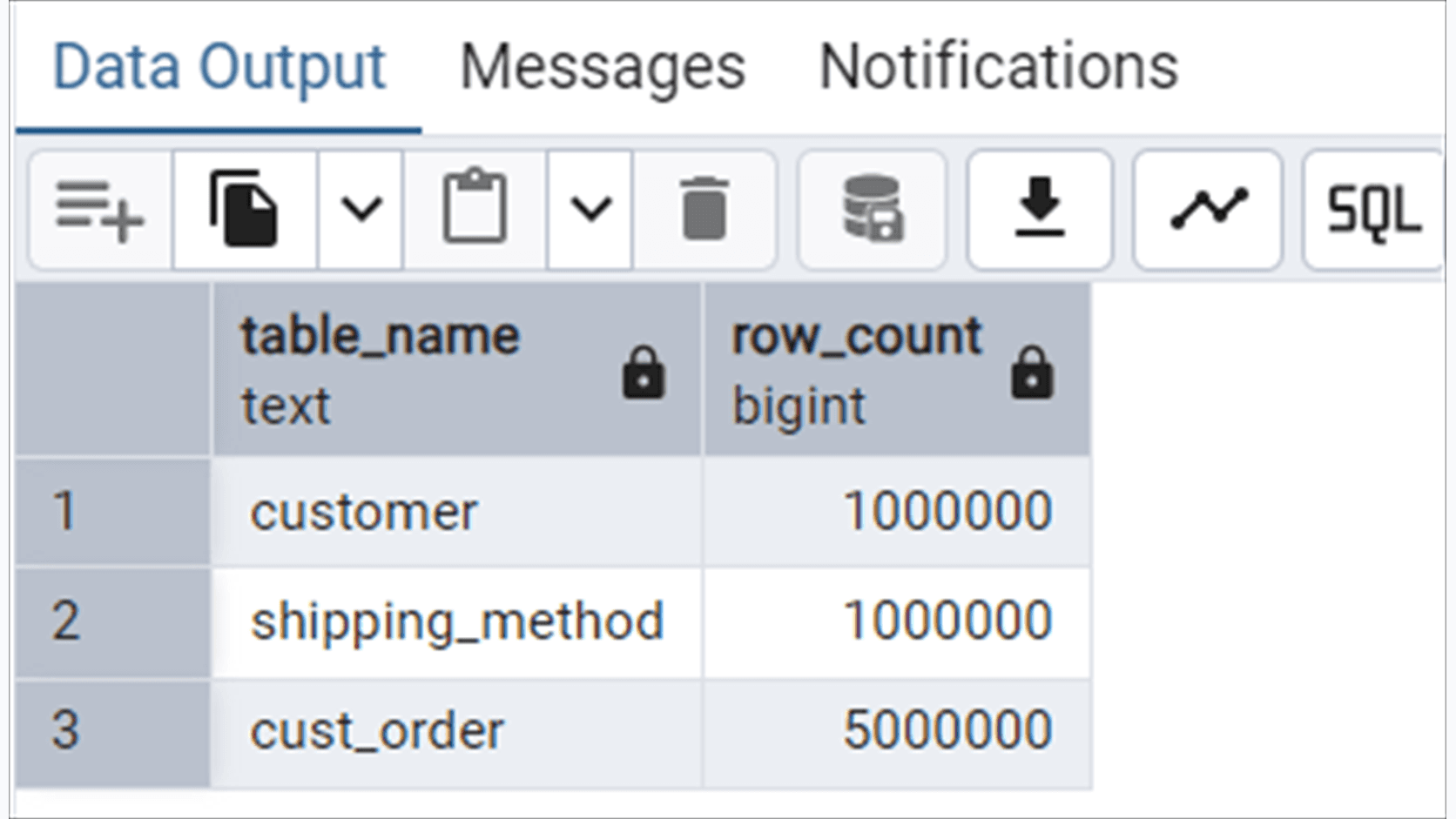
You should see one million customers, one million shipping-method rows, and five million orders.
Prepare the tables for a fair test
Run:
ANALYZE samples the data and updates statistics used by the optimizer. Without current statistics, PostgreSQL may make poor row-count estimates and choose an unsuitable plan.
For a controlled index-only-scan demonstration, you can also run the following statements separately with pgAdmin auto-commit enabled:
VACUUM updates visibility information, which can allow PostgreSQL to return values directly from an index without checking the table.
Test 1: the IN subquery
We will initially test the first one million orders so that the comparison finishes quickly:
EXPLAIN (ANALYZE, BUFFERS, TIMING OFF, SUMMARY ON)SELECT
co.order_id,
co.order_date,
c.first_name,
c.last_name,
c.email
FROM cust_order AS co
JOIN customer AS c
ON c.customer_id = co.customer_id
WHERE co.order_id <= 1000000AND co.shipping_method_id IN(SELECT sm.method_id
FROM shipping_method AS sm
WHERE sm.method_name = 'International')
EXPLAIN (ANALYZE, BUFFERS, TIMING OFF, SUMMARY ON)SELECT
co.order_id,
co.order_date,
c.first_name,
c.last_name,
c.email
FROM cust_order AS co
JOIN customer AS c
ON c.customer_id = co.customer_id
WHERE co.order_id <= 1000000AND co.shipping_method_id IN(SELECT sm.method_id
FROM shipping_method AS sm
WHERE sm.method_name = 'International')
EXPLAIN (ANALYZE, BUFFERS, TIMING OFF, SUMMARY ON)SELECT
co.order_id,
co.order_date,
c.first_name,
c.last_name,
c.email
FROM cust_order AS co
JOIN customer AS c
ON c.customer_id = co.customer_id
WHERE co.order_id <= 1000000AND co.shipping_method_id IN(SELECT sm.method_id
FROM shipping_method AS sm
WHERE sm.method_name = 'International')
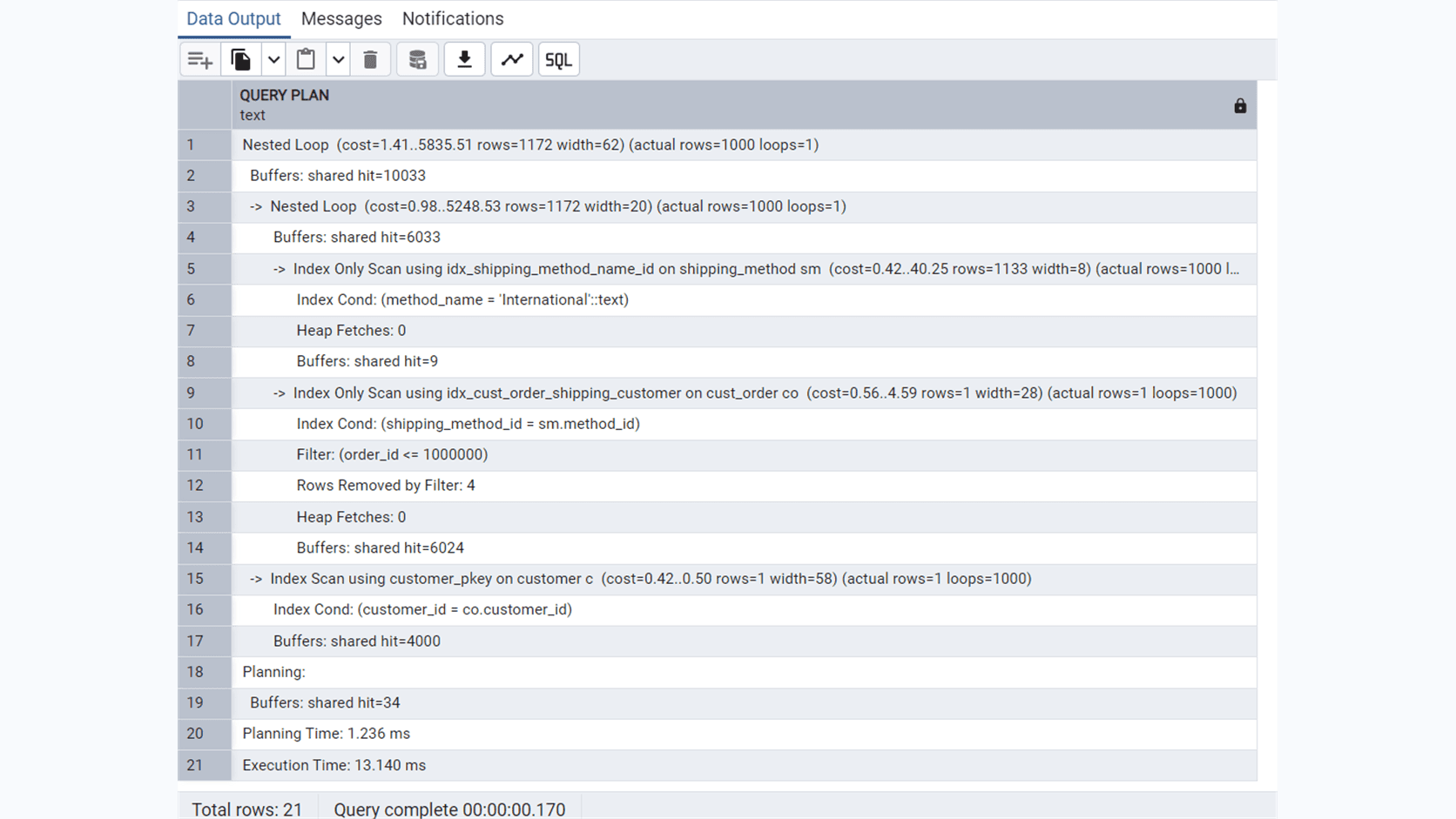
Here is the execution plan from my run:
The important part is what the plan does not show: there is no separately repeated SubPlan for the IN clause.
Instead, PostgreSQL uses:
Index Only Scan on shipping_method↓Nested Loop↓Index Only Scan on cust_order↓Index Scan on customer
Index Only Scan on shipping_method↓Nested Loop↓Index Only Scan on cust_order↓Index Scan on customer
Index Only Scan on shipping_method↓Nested Loop↓Index Only Scan on cust_order↓Index Scan on customer
PostgreSQL transformed the IN condition into a join-like operation:
Find International method IDs↓Use those IDs to find matching orders↓Use customer IDs to find customers
Find International method IDs↓Use those IDs to find matching orders↓Use customer IDs to find customers
Find International method IDs↓Use those IDs to find matching orders↓Use customer IDs to find customers
On this run, PostgreSQL returned 1,000 rows in 13.140 ms. Your time will differ depending on hardware, cache state, PostgreSQL configuration, and background activity.
The plan also shows:
Heap Fetches:0
Buffers:shared hit=10033
Heap Fetches:0
Buffers:shared hit=10033
Heap Fetches:0
Buffers:shared hit=10033
Heap Fetches: 0 means the two index-only scans did not need to visit their main tables. shared hit means the required pages were already in PostgreSQL's memory cache.
Test 2: the explicit join
Now rewrite the IN condition as an explicit join:
EXPLAIN (ANALYZE, BUFFERS, TIMING OFF, SUMMARY ON)SELECT
co.order_id,
co.order_date,
c.first_name,
c.last_name,
c.email
FROM cust_order AS co
JOIN customer AS c
ON c.customer_id = co.customer_id
JOIN shipping_method AS sm
ON sm.method_id = co.shipping_method_id
WHERE co.order_id <= 1000000AND sm.method_name = 'International'
EXPLAIN (ANALYZE, BUFFERS, TIMING OFF, SUMMARY ON)SELECT
co.order_id,
co.order_date,
c.first_name,
c.last_name,
c.email
FROM cust_order AS co
JOIN customer AS c
ON c.customer_id = co.customer_id
JOIN shipping_method AS sm
ON sm.method_id = co.shipping_method_id
WHERE co.order_id <= 1000000AND sm.method_name = 'International'
EXPLAIN (ANALYZE, BUFFERS, TIMING OFF, SUMMARY ON)SELECT
co.order_id,
co.order_date,
c.first_name,
c.last_name,
c.email
FROM cust_order AS co
JOIN customer AS c
ON c.customer_id = co.customer_id
JOIN shipping_method AS sm
ON sm.method_id = co.shipping_method_id
WHERE co.order_id <= 1000000AND sm.method_name = 'International'
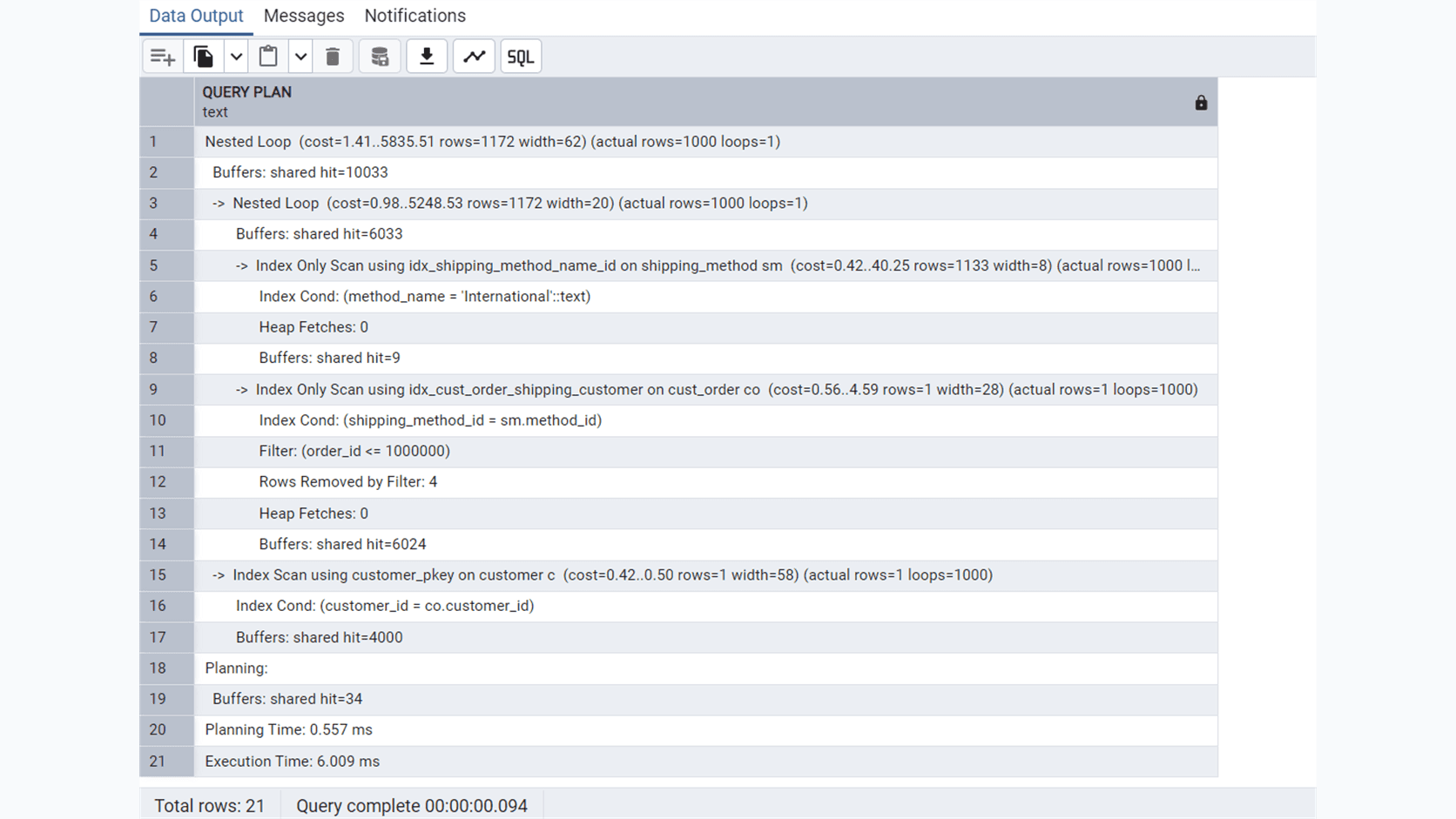
You will probably see a plan that is very similar to the IN plan. PostgreSQL may choose the same indexes, join order, and nested-loop strategy.
Why can PostgreSQL do this safely?
The subquery returns shipping_method.method_id, and method_id is a primary key. It cannot contain duplicate values or NULL. A matching order therefore cannot be duplicated by joining to repeated copies of the same method ID.
The lesson is:
An uncorrelated IN subquery does not necessarily execute once per outer row. PostgreSQL can integrate it into the main join plan.
Test 3: the scalar correlated subquery
Now move the shipping-method lookup into a scalar subquery:
EXPLAIN (ANALYZE, BUFFERS, TIMING OFF, SUMMARY ON)SELECT
co.order_id,
co.order_date,
c.first_name,
c.last_name,
c.email
FROM cust_order AS co
JOIN customer AS c
ON c.customer_id = co.customer_id
WHERE co.order_id <= 1000000AND(SELECT sm.method_name
FROM shipping_method AS sm
WHERE sm.method_id = co.shipping_method_id
) = 'International'
EXPLAIN (ANALYZE, BUFFERS, TIMING OFF, SUMMARY ON)SELECT
co.order_id,
co.order_date,
c.first_name,
c.last_name,
c.email
FROM cust_order AS co
JOIN customer AS c
ON c.customer_id = co.customer_id
WHERE co.order_id <= 1000000AND(SELECT sm.method_name
FROM shipping_method AS sm
WHERE sm.method_id = co.shipping_method_id
) = 'International'
EXPLAIN (ANALYZE, BUFFERS, TIMING OFF, SUMMARY ON)SELECT
co.order_id,
co.order_date,
c.first_name,
c.last_name,
c.email
FROM cust_order AS co
JOIN customer AS c
ON c.customer_id = co.customer_id
WHERE co.order_id <= 1000000AND(SELECT sm.method_name
FROM shipping_method AS sm
WHERE sm.method_id = co.shipping_method_id
) = 'International'
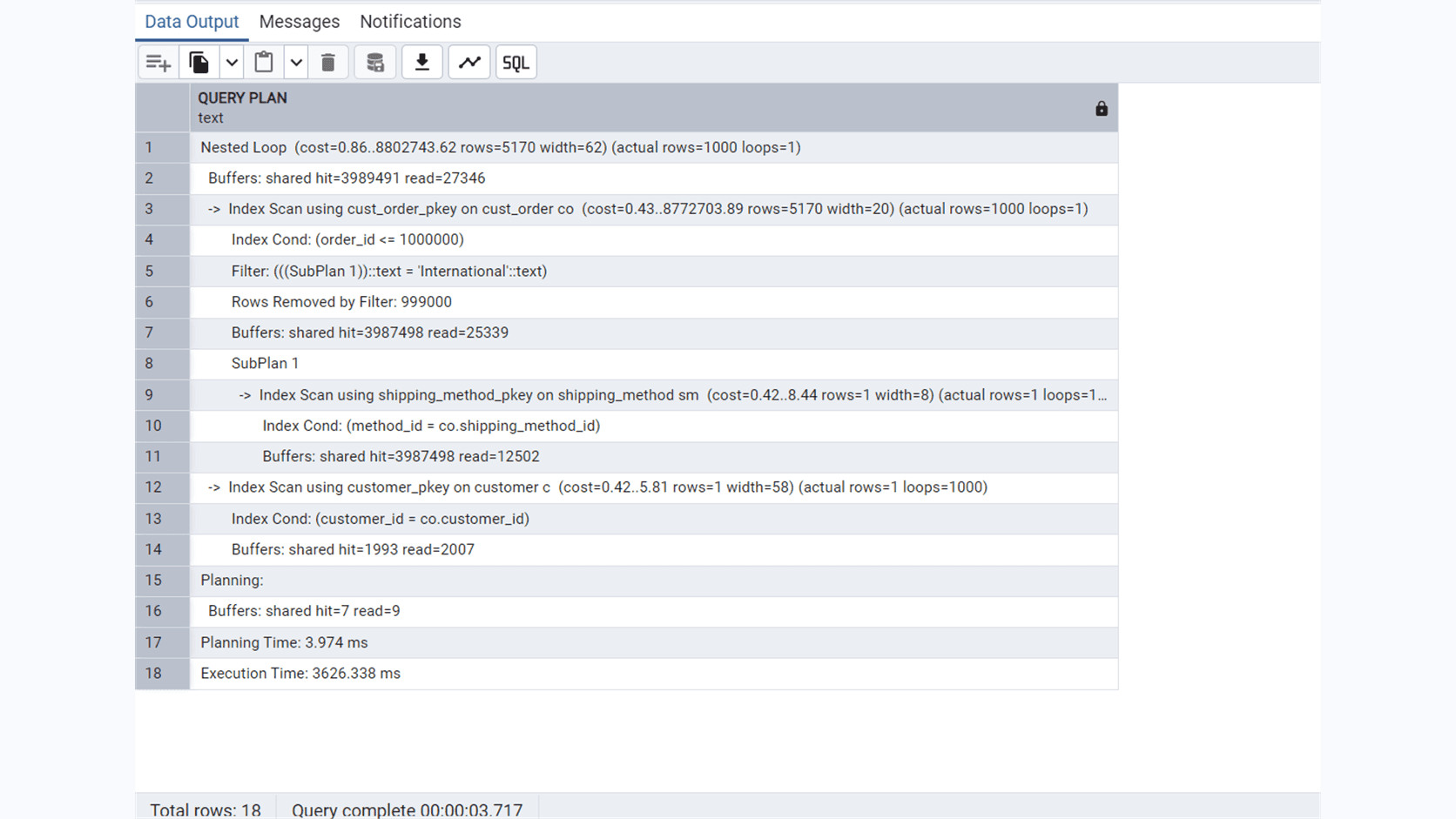
This subquery references the current outer order:
That makes it correlated. A plan may show something like:
SubPlan 1Index Scan on shipping_methodactual rows=1loops=1000000
SubPlan 1Index Scan on shipping_methodactual rows=1loops=1000000
SubPlan 1Index Scan on shipping_methodactual rows=1loops=1000000
The exact values may differ, but the large loops number is the key.
If the node reports:
actual rows=1loops=1000000
actual rows=1loops=1000000
actual rows=1loops=1000000
it means that internal lookup ran one million times and produced approximately one row per invocation. It does not mean the final query returned one million rows. Most outer orders may still be rejected by the International filter.
Compare the results fairly
Run every query three times in the same pgAdmin session:
Ignore the first result because it may warm the cache.
Record the second and third execution times.
Keep the same order_id <= 1000000 condition.
Keep the same EXPLAIN options.
Do not change indexes between tests.
Complete this table using your measured results:
Query form
Run 2
Run 3
Plan observation
Uncorrelated IN
15.409 ms
16.828 ms
Usually converted to a join-like plan
Explicit JOIN
11.369 ms
14.050 ms
Often similar to IN
Scalar correlated subquery
8065.877 ms
10166.810 ms
Look for a repeatedly executed SubPlan
Why IN and JOIN can be similar
SQL describes the result we want. It does not force PostgreSQL to follow the clauses in the order we wrote them.
This condition:
WHERE co.shipping_method_id IN(SELECT sm.method_id
FROM shipping_method AS sm
WHERE sm.method_name = 'International')
WHERE co.shipping_method_id IN(SELECT sm.method_id
FROM shipping_method AS sm
WHERE sm.method_name = 'International')
WHERE co.shipping_method_id IN(SELECT sm.method_id
FROM shipping_method AS sm
WHERE sm.method_name = 'International')
means:
Keep an order ifat least one matching method ID exists
Keep an order ifat least one matching method ID exists
Keep an order ifat least one matching method ID exists
That is semi-join logic. PostgreSQL can often implement IN or EXISTS using a nested-loop, hash, or merge semi-join.
By contrast, a scalar correlated subquery asks PostgreSQL to produce an individual value associated with the current outer row. That form is more likely to remain as a repeatedly executed subplan.
This is not an absolute rule. PostgreSQL may decorrelate some correlated queries, and it may choose a hashed subplan for some uncorrelated queries. Always inspect the actual plan.
What about EXISTS?
The EXISTS version is:
SELECT
co.order_id,
co.order_date,
c.first_name,
c.last_name,
c.email
FROM cust_order AS co
JOIN customer AS c
ON c.customer_id = co.customer_id
WHERE co.order_id <= 1000000ANDEXISTS(SELECT1FROM shipping_method AS sm
WHERE sm.method_id = co.shipping_method_id
AND sm.method_name = 'International')
SELECT
co.order_id,
co.order_date,
c.first_name,
c.last_name,
c.email
FROM cust_order AS co
JOIN customer AS c
ON c.customer_id = co.customer_id
WHERE co.order_id <= 1000000ANDEXISTS(SELECT1FROM shipping_method AS sm
WHERE sm.method_id = co.shipping_method_id
AND sm.method_name = 'International')
SELECT
co.order_id,
co.order_date,
c.first_name,
c.last_name,
c.email
FROM cust_order AS co
JOIN customer AS c
ON c.customer_id = co.customer_id
WHERE co.order_id <= 1000000ANDEXISTS(SELECT1FROM shipping_method AS sm
WHERE sm.method_id = co.shipping_method_id
AND sm.method_name = 'International')
Although it references the outer query, PostgreSQL can frequently turn this form into a semi-join too. Correlation alone does not guarantee poor performance. The scalar correlated form is the more instructive comparison in this experiment.
NOT IN deserves special care
NOT IN can behave unexpectedly when the inner result contains NULL.
3NOTIN(1,2,NULL)
3NOTIN(1,2,NULL)
3NOTIN(1,2,NULL)
Conceptually becomes:
3 <> 1AND 3 <> 2AND 3 <> NULLTRUE AND TRUE AND UNKNOWN
3 <> 1AND 3 <> 2AND 3 <> NULLTRUE AND TRUE AND UNKNOWN
3 <> 1AND 3 <> 2AND 3 <> NULLTRUE AND TRUE AND UNKNOWN
The result is UNKNOWN, and a WHERE clause keeps only TRUE rows.
For anti-matching logic, NOT EXISTS is frequently clearer:
SELECT co.*
FROM cust_order AS co
WHERENOTEXISTS(SELECT1FROM shipping_method AS sm
WHERE sm.method_id = co.shipping_method_id
)
SELECT co.*
FROM cust_order AS co
WHERENOTEXISTS(SELECT1FROM shipping_method AS sm
WHERE sm.method_id = co.shipping_method_id
)
SELECT co.*
FROM cust_order AS co
WHERENOTEXISTS(SELECT1FROM shipping_method AS sm
WHERE sm.method_id = co.shipping_method_id
)
This returns orders that have no matching shipping-method row. In our lab, the valid foreign key means it should return zero rows.
Index design matters more than syntax alone
The lab uses this covering index:
CREATE INDEX idx_cust_order_shipping_customer
ON cust_order (shipping_method_id, customer_id)
INCLUDE (order_id, order_date)
CREATE INDEX idx_cust_order_shipping_customer
ON cust_order (shipping_method_id, customer_id)
INCLUDE (order_id, order_date)
CREATE INDEX idx_cust_order_shipping_customer
ON cust_order (shipping_method_id, customer_id)
INCLUDE (order_id, order_date)
The key columns help PostgreSQL search:
shipping_method_id,customer_id
shipping_method_id,customer_id
shipping_method_id,customer_id
The included columns are extra values that PostgreSQL may return directly from the index:
order_id,order_date
order_id,order_date
order_id,order_date
An included column is not a search key. That is why the plan shows:
Index Cond:shipping_method_id = sm.method_id
Filter:order_id <= 1000000
Index Cond:shipping_method_id = sm.method_id
Filter:order_id <= 1000000
Index Cond:shipping_method_id = sm.method_id
Filter:order_id <= 1000000
If this exact query were extremely important, a more targeted index could be:
CREATE INDEX idx_cust_order_shipping_order
ON cust_order (shipping_method_id, order_id)
INCLUDE (customer_id, order_date)
CREATE INDEX idx_cust_order_shipping_order
ON cust_order (shipping_method_id, order_id)
INCLUDE (customer_id, order_date)
CREATE INDEX idx_cust_order_shipping_order
ON cust_order (shipping_method_id, order_id)
INCLUDE (customer_id, order_date)
Now both filtering columns are index keys. However, every additional index increases storage and makes writes more expensive. An execution time around 13 ms does not justify adding an index automatically.
Final conclusion
The useful lesson is not “joins are always faster.” The useful lesson is:
PostgreSQL can optimize IN and EXISTS into efficient join-like plans. An explicit join may substantially outperform a scalar correlated subquery when the correlated lookup executes once for every outer row. Confirm the difference with EXPLAIN (ANALYZE, BUFFERS) instead of relying on syntax-based rules.
When reviewing SQL performance, ask:
How many rows did each node process?
How many times did it loop?
Were estimates close to reality?
Did PostgreSQL use an appropriate index?
Did it read from memory or storage?
Did a subplan run millions of times?
Those questions are more valuable than memorizing “join good, subquery bad.”