How a PostgreSQL Index Turned a 231 ms Query into 0.8 ms
A query can run quickly on a small table but become slow when the same table grows to millions of rows. In this practical PostgreSQL experiment, I created an orders table with one million records and searched for orders belonging to one customer. Without an index, PostgreSQL examined almost the entire table. After creating one index, it located the required rows in under one millisecond. This article shows how to reproduce the test in pgAdmin 4 and explains when indexes are useful in real-world applications.

What Is a Database Index?
A database index helps PostgreSQL find rows without scanning the entire table.
Think of a table as a large book:
Rows are the information inside the book.
Table pages are the physical pages containing that information.
An index tells PostgreSQL which pages contain the required rows.
An index generally stores:
For example:
PostgreSQL can use these locations to visit only the required table pages.
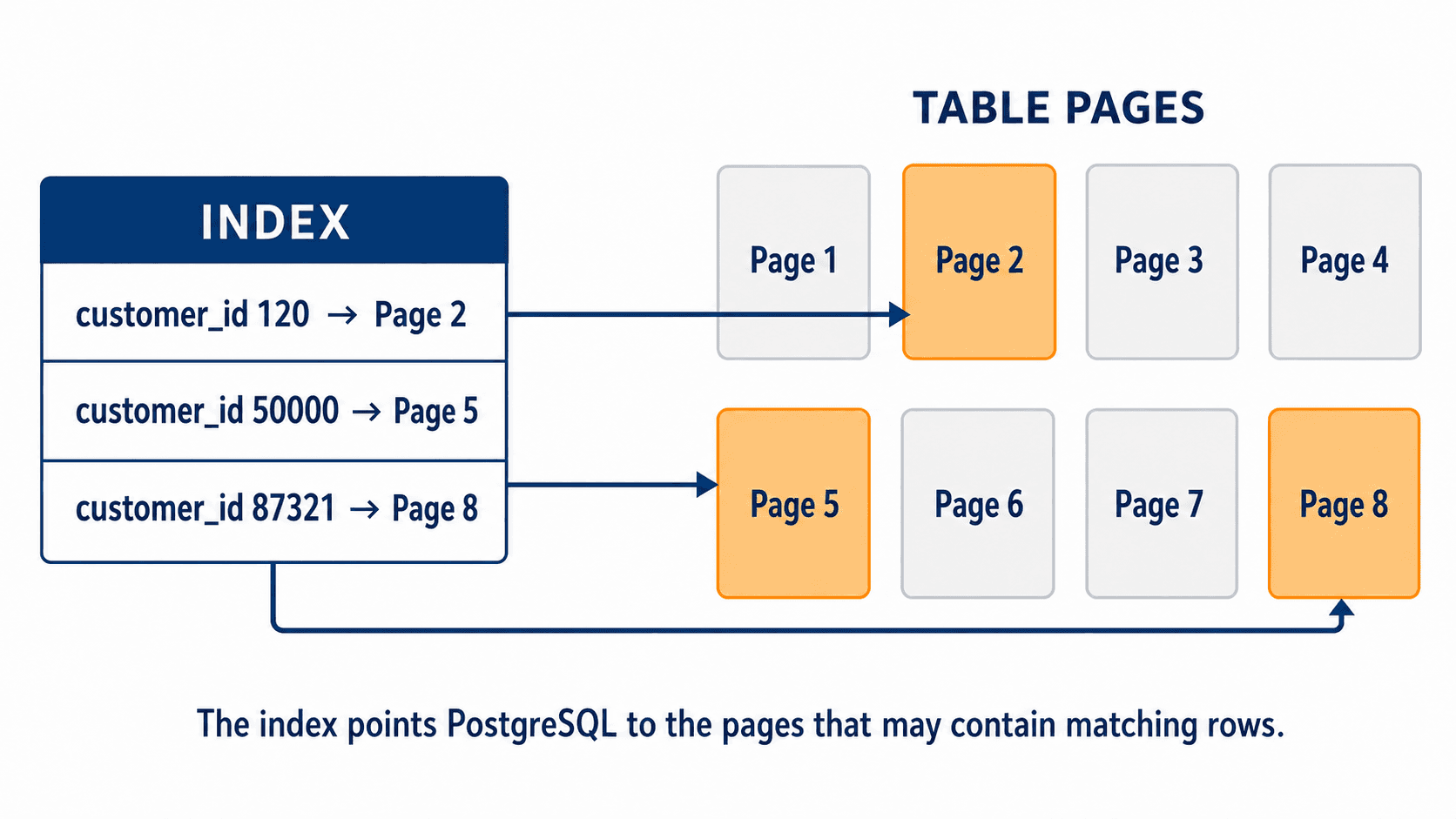
An index helps PostgreSQL jump directly to relevant table pages instead of scanning every page.
Practical Indexing Test in pgAdmin 4
Step 1: Create the Orders Table
Open pgAdmin 4, select your database, and open the Query Tool.
Run:
Here:
order_idis generated automatically.customer_ididentifies the customer.order_datestores the order date.order_statusstores values such asPendingorCompleted.total_amountstores the order value.
Step 2: Insert One Million Test Records
This creates one million sample orders with:
Customer IDs between 1 and 100,000
Dates from approximately the last two years
Four possible order statuses
Random order amounts
Update PostgreSQL’s statistics:
PostgreSQL uses these statistics to estimate how many rows a query will return and choose an execution plan.
Confirm the row count:
Expected result:
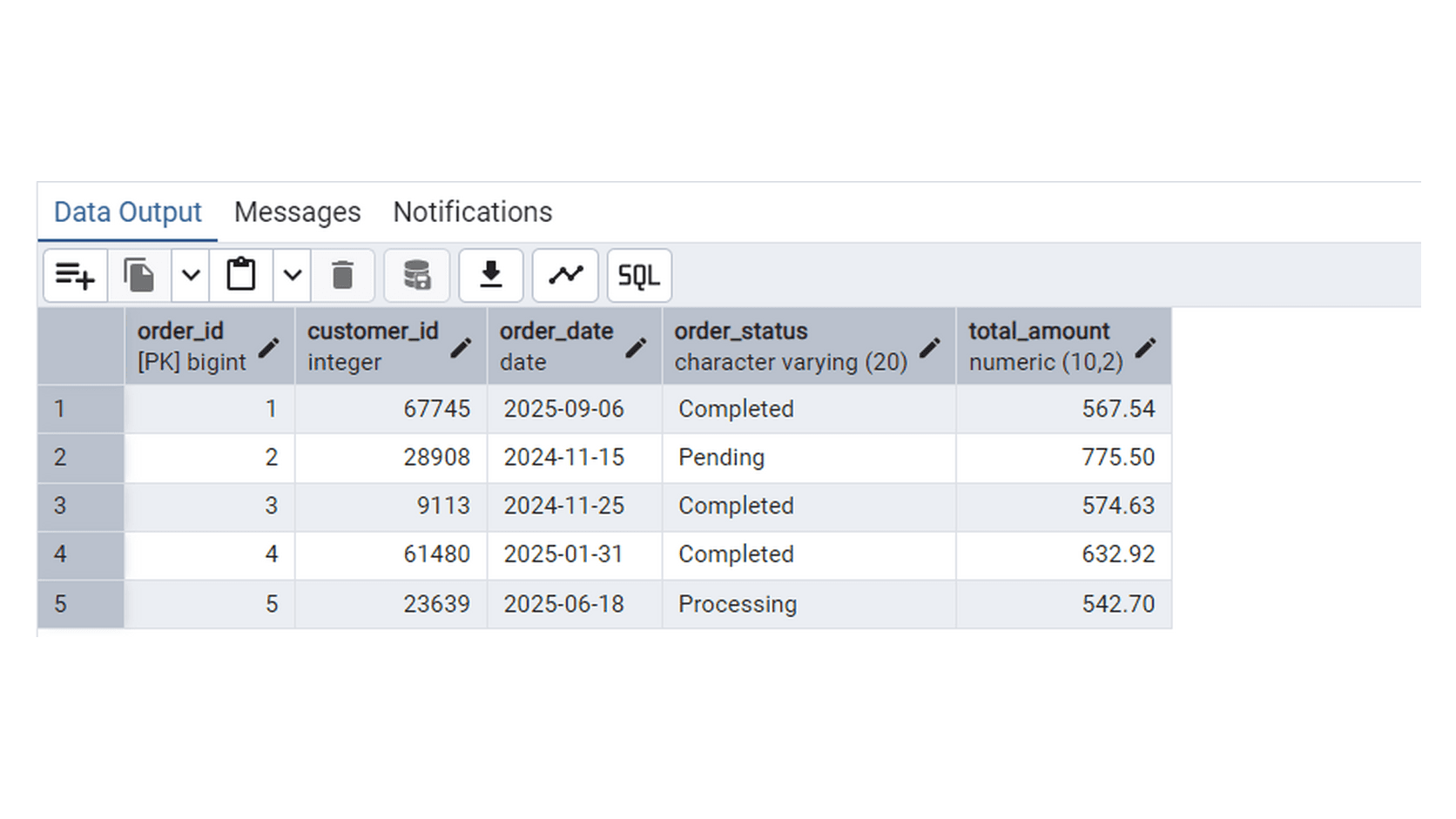
Sample records from the orders table in PostgreSQL, displayed in pgAdmin.
Step 3: Test the Query Without an Index
Run:
Before creating the index, PostgreSQL used:
A sequential scan means PostgreSQL reads table pages and checks the rows one by one.
In my test, PostgreSQL:
Returned only 8 rows
Examined almost one million rows
Accessed 8,104 table pages
Took 231.730 milliseconds
The execution plan showed:
Three processes participated in the parallel scan, so approximately:
PostgreSQL scanned almost the entire table to return only eight records.
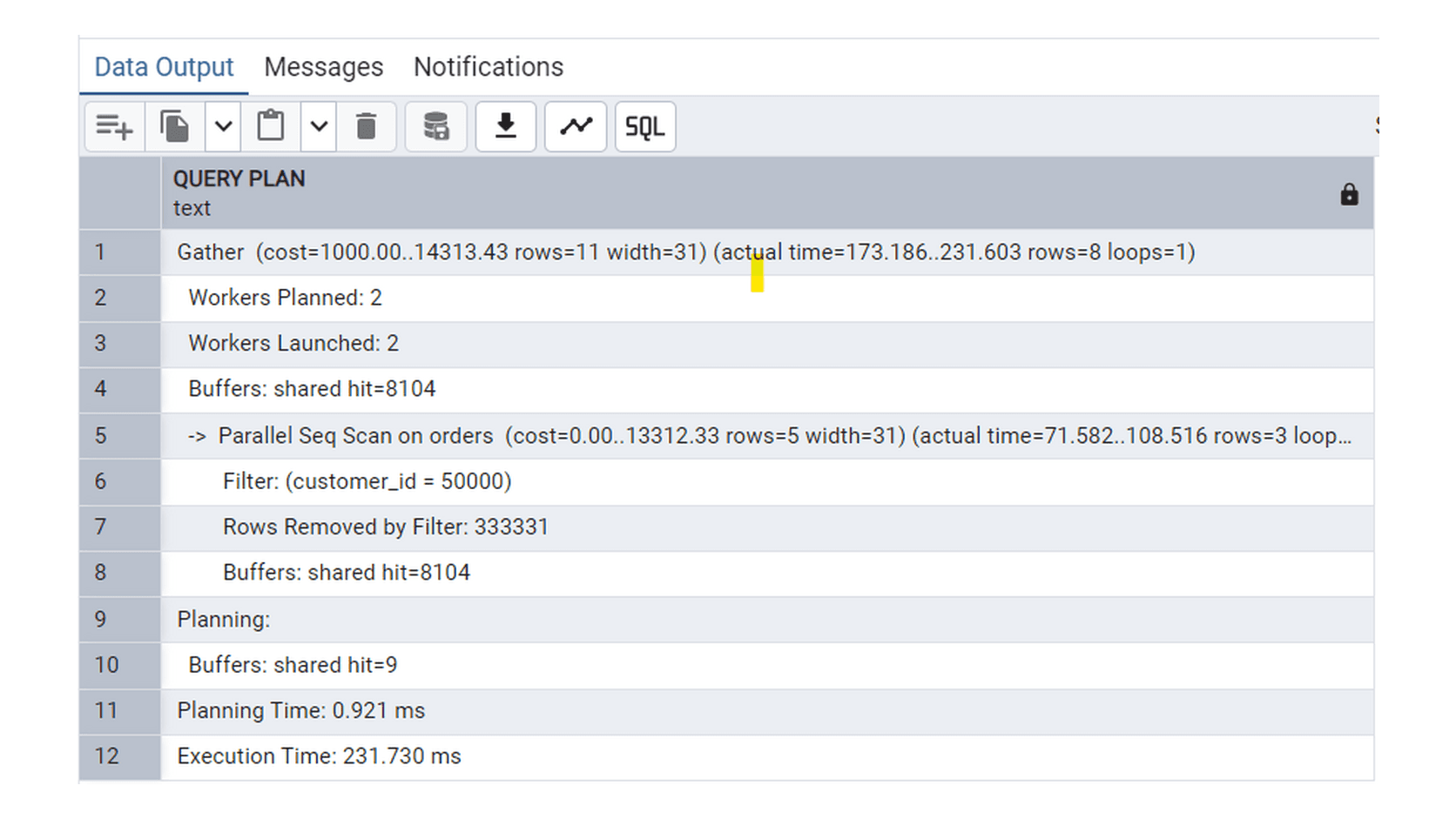
Without an index, PostgreSQL performed a Parallel Sequential Scan and examined almost the entire table.
What Are Table Pages?
PostgreSQL stores table data in fixed-size blocks called pages.
A PostgreSQL page is normally:
Each page can contain several rows.
Your one-million-row table was stored across approximately 8,104 pages. Without an index, PostgreSQL had to inspect all those pages because it did not know where the matching customer records were located.
Simplified:
Even though the pages were already available in memory, PostgreSQL still had to process their rows.
Step 4: Create an Index
Create an index on the column used in the WHERE condition:
Refresh the statistics:
You can confirm the index exists:
Expected index:
Step 5: Run the Same Query Again
Run the same query:
This time, PostgreSQL used:
The process was:
Search the index for
customer_id = 50000.Identify the locations of the matching rows.
Visit only the relevant table pages.
Retrieve the complete order records.
The plan showed:
PostgreSQL accessed only eight table pages instead of scanning all 8,104 pages.
The query completed in:
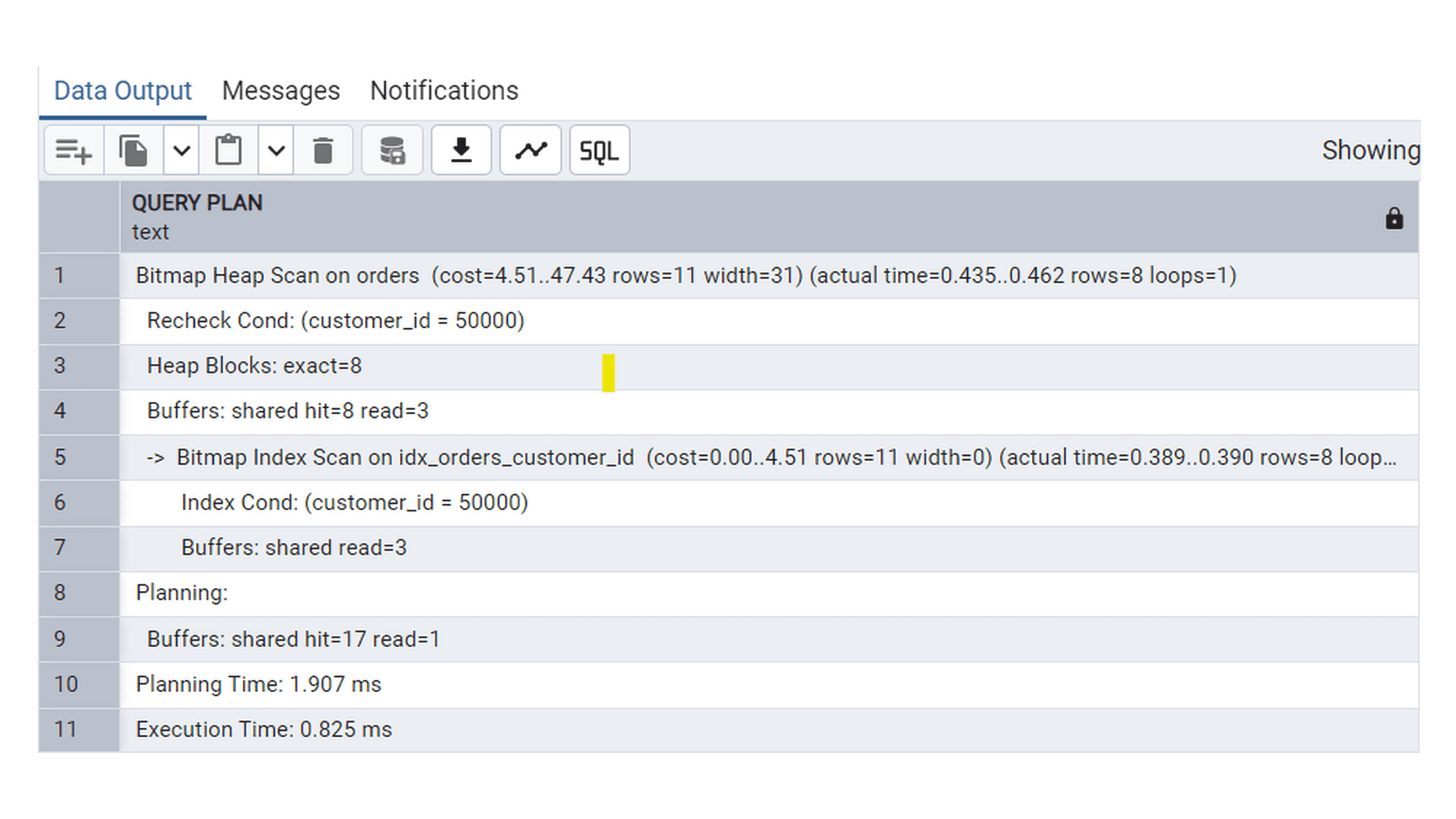
With the index, PostgreSQL located the matching rows through a Bitmap Index Scan and accessed only eight table pages.
Performance Comparison
Metric | Without index | With index |
|---|---|---|
Execution method | Parallel Sequential Scan | Bitmap Index Scan |
Rows returned | 8 | 8 |
Table pages accessed | 8,104 | 8 heap pages |
Execution time | 231.730 ms | 0.825 ms |
Approximate improvement | — | 281× faster |
The exact timing may vary across computers and with repeated executions due to memory caching, hardware, and PostgreSQL configuration.
However, the important improvement is clear: the index prevented PostgreSQL from scanning thousands of unnecessary table pages.
Why Did PostgreSQL Use a Bitmap Scan?
You may expect PostgreSQL to show a normal Index Scan, but it selected:
The bitmap index scan first locates all matching row locations. PostgreSQL then groups the required table-page visits and retrieves the full rows efficiently.
This is still successful index usage.
The index was created only on customer_id, but the query used:
PostgreSQL therefore needed to visit the main table to retrieve the remaining columns:
order_idorder_dateorder_statustotal_amount
When Should You Create an Index?
Indexes are most useful when:
A large table is frequently filtered using
WHERE.A column is regularly used in a
JOIN.Queries frequently use
ORDER BY.The query returns only a small percentage of the table.
The indexed column contains many different values.
The same query is executed repeatedly.
Common examples include:
For a query that filters by customer and sorts by date, a composite index may be useful:
This can support:
When Might an Index Not Help?
An index may provide little benefit when:
The table is very small.
The query returns a large part of the table.
The indexed column has very few distinct values.
The table receives heavy insert, update, and delete activity.
For example, order_status has only four possible values:
If one status matches 25% of the table, PostgreSQL may decide that a sequential scan is more efficient.
Indexes also have a cost. Every index:
Uses additional storage
Must be updated during inserts
Must be updated during updates
Must be maintained during deletes
The goal is not to index every column. The goal is to create indexes that support frequently executed and important queries.
How to Check Whether an Index Helps
Use:
to view PostgreSQL’s estimated plan.
Use:
to execute the query and display actual results.
Use:
to include information about the table and index pages accessed.
Compare:
Sequential Scan versus Index Scan
Execution time
Buffer usage
Rows removed by filter
Estimated rows versus actual rows
Sort operations
Do not judge an index using execution time alone. Cached data may make later query runs faster.
Conclusion
Without an index, PostgreSQL may need to inspect an entire table to find a few rows.
In this experiment, the unindexed query:
Scanned almost one million rows
Accessed 8,104 table pages
Took 231.730 milliseconds
After indexing customer_id, PostgreSQL:
Located the required rows through the index
Accessed only eight table pages
Completed the query in 0.825 milliseconds
Indexes are most effective on large tables when frequently executed queries return a small number of rows.
The best approach is simple:
Identify an important query, inspect its execution plan, create an appropriate index, and measure the result.
